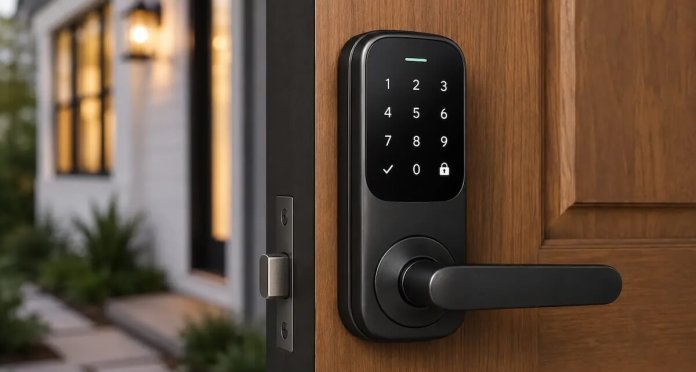
The best smart lock to buy for most homes is the Schlage Encode Plus. It combines top-rated security, built-in Wi-Fi, and Apple Home Key support. For a fingerprint lock, choose the Ultraloq U-Bolt Pro WiFi (Grade 1) or the budget eufy C220. For the best simple keypad deadbolt with no app, the Schlage BE365 is still hard to beat.
Swapping a key-only deadbolt for a smart lock or keypad deadbolt is one of the most useful upgrades you can make. No more hidden spare keys, no more re-keying when a key goes missing, and you can let in a contractor or family member from anywhere.
As a builder, landlord, and property manager for 35+ years, I’ve learned that the best lock isn’t always the one with the most features. It’s the one that fits your door, your household, and the way you actually come and go.
If you’re looking for the best smart lock keypads and deadbolts, this guide sorts the top picks by what each does best.
I’ve used smart lock keypads and deadbolt devices in my home and rentals for many years. They not only help us quickly lock and enter our home (without fumbling for keys) but can also, via a WiFi connection, let you authorize entry for family, service appointments, or renters to access any property using your phone App from a remote location.
Want to avoid monthly fees entirely? See the best smart locks with no subscription required.
Smart Lock & Keypad Deadbolt Comparison
| Lock | Best For | Type | Connection | Batteries |
|---|---|---|---|---|
| Schlage Encode Plus | Best Overall | Touchscreen deadbolt | Wi-Fi | 4 AA |
| Schlage Encode | Best Value Wi-Fi | Touchscreen deadbolt | Wi-Fi | 4 AA |
| Yale Assure Lock 2 Wi-Fi | Best Looking | Touchscreen deadbolt | Wi-Fi | 4 AA |
| Ultraloq U-Bolt Pro WiFi | Best Fingerprint | Fingerprint + keypad | Wi-Fi | 4 AA |
| eufy C220 | Budget Fingerprint | Fingerprint + keypad | Wi-Fi | 8 AA |
| Lockly Secure Pro | Best Privacy | Fingerprint + PIN Genie | Wi-Fi | AA |
| August Wi-Fi (4th Gen) | Best Retrofit | Interior retrofit | Wi-Fi | 2 CR123A |
| Yale Assure Lock 2 Bluetooth | Upgradeable | Touchscreen deadbolt | Bluetooth | 4 AA |
| Schlage BE365 | Best Basic Keypad | Push-button keypad | No app | 9V |
Editor’s Choice: Best Smart Lock Overall — Schlage Encode Plus Smart Wi-Fi Deadbolt
Research pick
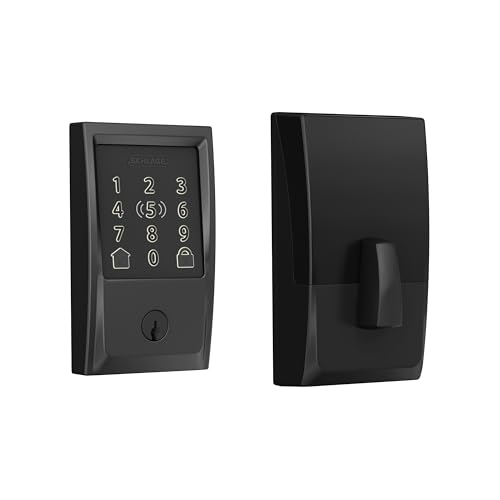
Why We Like the Schlage Encode Plus Smart Wi-Fi Deadbolt
Schlage has made locks in America for over a century, and the Encode Plus is its flagship smart deadbolt. Wi-Fi is built in, so you can lock, unlock, and check the door from anywhere with the free Schlage Home app. You don’t need a hub or bridge.
It is also one of the few locks that supports Apple Home Key, so you can tap an iPhone or Apple Watch to unlock it like a hotel key card. Industry testing gives it the highest BHMA rating for security, durability, and finish.
Schlage Encode Plus Smart Wi-Fi Deadbolt Specifications
- Built-in Wi-Fi (2.4 GHz) with no hub required
- Touchscreen keypad with up to 100 access codes
- Apple Home Key tap-to-unlock, plus Alexa, Google, and Siri
- Highest BHMA rating for security, durability, and finish
- Built-in alarm sensor
- Runs on 4 AA batteries, up to about 6 months with typical use
- Limited lifetime mechanical and finish warranty; 3-year electronics
Schlage Encode Plus Smart Wi-Fi Deadbolt: Pros and Cons
Pros
- ✓Top-rated security and build quality
- ✓Apple Home Key support
- ✓Up to 100 codes for family, guests and contractors
- ✓No subscription for any app feature
Cons
- ✗Premium price
- ✗Wi-Fi shortens battery life compared with Bluetooth locks
- ✗No fingerprint reader
Our Take on the Schlage Encode Plus Smart Wi-Fi Deadbolt
If you want the most trusted name in locks with every smart feature, this is the one to beat. In my experience, Schlage hardware holds up to years of daily use better than most.
Editor’s Choice – Schlage Encode Plus Smart Wi-Fi Deadbolt
CLICK HERE FOR PRICE >>>
Best Value Wi-Fi Smart Lock — Schlage Encode Smart Wi-Fi Deadbolt
Research pick

Why We Like the Schlage Encode Smart Wi-Fi Deadbolt
The original Encode offers nearly everything the Encode Plus does: built-in Wi-Fi, a touchscreen keypad, 100 user codes, and Schlage’s top BHMA security rating. It usually costs less.
The main difference is that the standard Encode doesn’t support Apple Home Key. If your household uses Android or Alexa, you won’t miss it.
Schlage Encode Smart Wi-Fi Deadbolt Specifications
- Built-in Wi-Fi with no hub
- Touchscreen with up to 100 access codes
- Works with Alexa and Google Assistant
- Highest BHMA security and durability rating
- Built-in alarm
- 4 AA batteries
Schlage Encode Smart Wi-Fi Deadbolt: Pros and Cons
Pros
- ✓Same solid Schlage build as the Plus
- ✓Lower price than Encode Plus
- ✓Easy screwdriver install
Cons
- ✗No Apple Home or Home Key support
- ✗Bulky interior unit
Our Take on the Schlage Encode Smart Wi-Fi Deadbolt
The Encode is a smart value buy for most homes that don’t use Apple Home. You get Schlage quality and remote access for less money.
Best Value Wi-Fi Smart Lock – Schlage Encode Smart Wi-Fi Deadbolt
CLICK HERE FOR PRICE >>>
Best-Looking Smart Lock — Yale Assure Lock 2 Touchscreen with Wi-Fi
Research pick
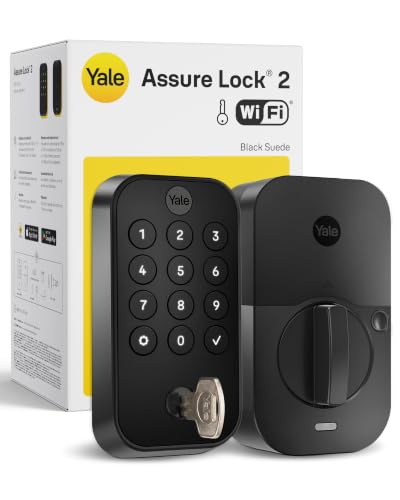
Why We Like the Yale Assure Lock 2 Touchscreen with Wi-Fi
Yale’s Assure Lock 2 is slimmer than most smart locks and comes in several finishes that blend in on a front door. The Wi-Fi version includes Yale’s DoorSense sensor, which knows whether the door is actually closed, so Auto-Lock only throws the bolt when it should.
You can unlock with the touchscreen, the Yale Access app, Apple Watch, Auto-Unlock as you arrive, or Alexa, Google, and Siri.
Yale Assure Lock 2 Touchscreen with Wi-Fi Specifications
- Wi-Fi module included for remote access
- Touchscreen keypad
- Auto-Lock with DoorSense and optional Auto-Unlock
- Works with Alexa, Google Assistant and Siri
- ANSI/BHMA Grade 2
- 4 AA batteries; 9V battery emergency power on the outside
- Fits doors 1-3/8 to 2-1/4 inches thick
Yale Assure Lock 2 Touchscreen with Wi-Fi: Pros and Cons
Pros
- ✓Slim, attractive design
- ✓DoorSense makes Auto-Lock smarter
- ✓Broad smart-home support
- ✓No subscription
Cons
- ✗Grade 2 rather than Grade 1/AAA
- ✗1-year electronics warranty
Our Take on the Yale Assure Lock 2 Touchscreen with Wi-Fi
The Yale Assure Lock 2 is a great fit if looks matter. It’s also the smart choice if you want Auto-Lock that won’t fire while the door is still open.
Best-Looking Smart Lock – Yale Assure Lock 2 Touchscreen with Wi-Fi
CLICK HERE FOR PRICE >>>
Best Fingerprint Smart Lock — Ultraloq U-Bolt Pro WiFi
Research pick

Why We Like the Ultraloq U-Bolt Pro WiFi
Ultraloq calls the U-Bolt Pro an 8-in-1 lock. It opens by fingerprint, code, app, voice, Auto-Unlock, shared e-keys, scheduled codes, or a hidden mechanical key. Wi-Fi is built in, and a door sensor warns you if the door is left open.
It carries an ANSI Grade 1 rating, the highest residential security grade, which is unusual at this price.
Ultraloq U-Bolt Pro WiFi Specifications
- Fingerprint, keypad, app, auto-unlock, and voice
- Built-in Wi-Fi with door sensor
- ANSI Grade 1 certified
- IP65 weather resistance
- Works with Alexa, Google Assistant and IFTTT
- Lifetime mechanical and 18-month electronic warranty
- 4 AA batteries
Ultraloq U-Bolt Pro WiFi: Pros and Cons
Pros
- ✓Grade 1 security
- ✓Fingerprint plus many unlock options
- ✓Door-left-open alerts
- ✓Good value
Cons
- ✗No Apple Home support
- ✗Some owners report Wi-Fi drains batteries faster
Our Take on the Ultraloq U-Bolt Pro WiFi
If you want fingerprint access and top-grade security without paying Schlage prices, the U-Bolt Pro WiFi is a strong pick. It’s especially good for rentals.
Best Fingerprint Smart Lock – Ultraloq U-Bolt Pro WiFi
CLICK HERE FOR PRICE >>>
Best Budget Fingerprint Lock — eufy Security Smart Lock C220
Research pick

Why We Like the eufy Security Smart Lock C220
The eufy C220 brings a fingerprint reader, built-in Wi-Fi, and a keypad at a price well below most name-brand smart locks. eufy says its fingerprint reader recognizes you in about 0.3 seconds, and it stores up to 50 fingerprints and 100 passcodes.
There’s no bridge to buy and no monthly fee. The app, alerts, and access history are all free, and it runs on 8 AA batteries rated for about 8 months.
eufy Security Smart Lock C220 Specifications
- Fingerprint, keypad, app, voice, and physical key
- Built-in Wi-Fi with no bridge
- Up to 50 fingerprints and 100 passcodes
- 8 AA batteries rated for about 8 months
- IP53 weather resistance
- Works with Alexa and Google Assistant
- BHMA Grade 3 certified
eufy Security Smart Lock C220: Pros and Cons
Pros
- ✓Fingerprint unlock at a budget price
- ✓Wi-Fi built-in
- ✓Long battery life
- ✓No subscription
Cons
- ✗Grade 3 (lowest residential grade)
- ✗No Apple Home support
- ✗Bulky exterior
Our Take on the eufy Security Smart Lock C220
For the money, the C220 is the best value smart lock I’ve found. It’s especially good for families with kids who forget codes, because a fingerprint is hard to lose.
Best Budget Fingerprint Lock – eufy Security Smart Lock C220
CLICK HERE FOR PRICE >>>
Best for Code Privacy — Lockly Secure Pro (Latest Version)
Research pick
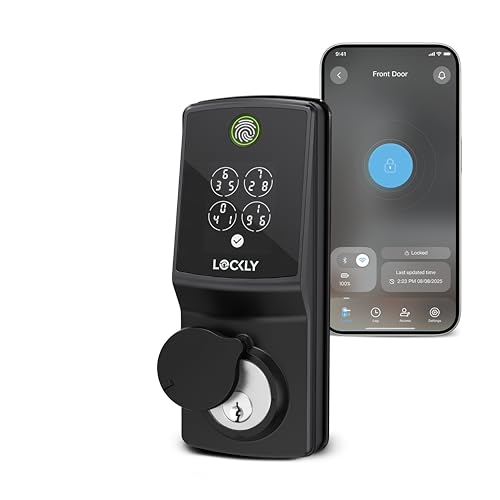
Why We Like the Lockly Secure Pro (Latest Version)
Lockly’s claim to fame is its patented PIN Genie keypad, which shuffles the number layout each time. Someone watching over your shoulder, or reading fingerprint smudges, can’t figure out your code.
The latest Secure Pro adds built-in Wi-Fi, a fast AI fingerprint sensor, and an interior unit about 25% smaller than the original.
Lockly Secure Pro (Latest Version) Specifications
- PIN Genie anti-peep keypad
- AI fingerprint sensor
- Built-in Wi-Fi, no hub
- IP65 weather resistance
- Auto-Lock and app control
- 5-year mechanical and 2-year electronic warranty
Lockly Secure Pro (Latest Version): Pros and Cons
Pros
- ✓Best-in-class code privacy
- ✓Fast fingerprint unlock
- ✓Smaller interior than before
- ✓No monthly fees
Cons
- ✗Expensive
- ✗Some users report Wi-Fi connection issues
- ✗Not for doors over 2 inches thick
Our Take on the Lockly Secure Pro (Latest Version)
For a rental, Airbnb, or any door where many people use codes, the anti-peep keypad is a real security advantage.
Best for Code Privacy – Lockly Secure Pro (Latest Version)
CLICK HERE FOR PRICE >>>
Best Retrofit Smart Lock — August Wi-Fi Smart Lock (4th Gen)
Research pick
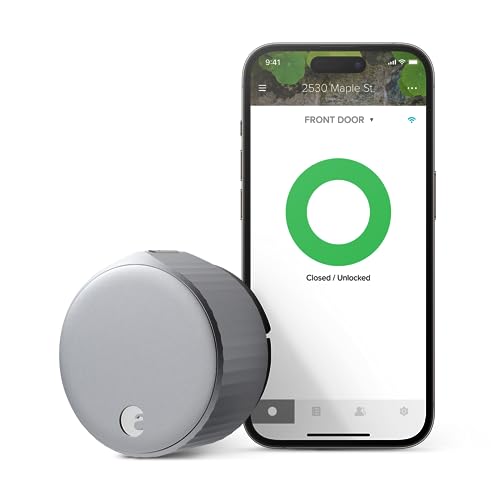
Why We Like the August Wi-Fi Smart Lock (4th Gen)
August takes a different approach. It replaces only the inside thumb turn of your existing deadbolt, so the outside of your door doesn’t change, and your current keys still work.
It installs in about 10 minutes, connects directly to Wi-Fi, and includes DoorSense for smarter Auto-Lock. It’s a good fit for renters, condo owners, and HOAs that don’t allow exterior changes.
August Wi-Fi Smart Lock (4th Gen) Specifications
- Retrofits your existing deadbolt; keep your keys
- Built-in Wi-Fi with DoorSense
- Auto-Lock and Auto-Unlock
- Works with Alexa, Google, Apple Home, and SmartThings
- 2 CR123A batteries
- About a 10-minute install
August Wi-Fi Smart Lock (4th Gen): Pros and Cons
Pros
- ✓Keeps your exterior hardware and keys
- ✓Works with Apple Home
- ✓Very compact
- ✓No subscription
Cons
- ✗No keypad included (sold separately)
- ✗Uses CR123A batteries
Our Take on the August Wi-Fi Smart Lock (4th Gen)
When you can’t or don’t want to change the outside of your door, August is the cleanest smart-lock solution.
Best Retrofit Smart Lock – August Wi-Fi Smart Lock (4th Gen)
CLICK HERE FOR PRICE >>>
Best Upgradeable Bluetooth Lock — Yale Assure Lock 2 Touchscreen (Bluetooth)
Research pick
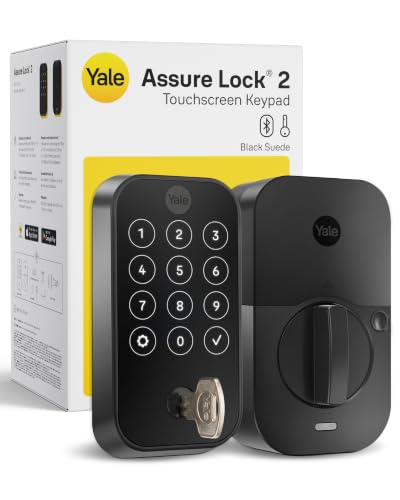
Why We Like the Yale Assure Lock 2 Touchscreen (Bluetooth)
This version of the Assure Lock 2 skips the Wi-Fi module and uses Bluetooth instead. That lowers the price and stretches battery life, while keeping Yale’s slim design and touchscreen.
You manage codes in the free Yale Access app when you’re near the door. You can add Yale’s Wi-Fi module later if you want remote access.
Yale Assure Lock 2 Touchscreen (Bluetooth) Specifications
- Touchscreen keypad
- Bluetooth app control
- Upgradeable to Wi-Fi with Yale module
- ANSI/BHMA Grade 2
- 4 AA batteries
Yale Assure Lock 2 Touchscreen (Bluetooth): Pros and Cons
Pros
- ✓Lower price than Wi-Fi version
- ✓Longer battery life
- ✓Upgrade path to Wi-Fi
Cons
- ✗No remote access out of the box
- ✗Codes set in app, not on keypad
Our Take on the Yale Assure Lock 2 Touchscreen (Bluetooth)
A good choice if you want Yale styling now and may add remote access later.
Best Upgradeable Bluetooth Lock – Yale Assure Lock 2 Touchscreen (Bluetooth)
CLICK HERE FOR PRICE >>>
Best Basic Keypad Deadbolt — Schlage BE365 Camelot Keypad Deadbolt
Research pick

Why We Like the Schlage BE365 Camelot Keypad Deadbolt
Not everyone needs an app. The Schlage BE365 is a proven, simple keypad deadbolt that I’ve seen on countless homes and rentals. You program up to 19 codes right on the keypad, and it runs on a single 9-volt battery.
There’s nothing to connect, nothing to update, and no subscription. It just works.
Schlage BE365 Camelot Keypad Deadbolt Specifications
- Backlit keypad with up to 19 user codes
- Several Different Finishes to Choose From
- Mechanical key backup
- One 9V battery, rated up to about 2 years
- ANSI Grade 2
- No Wi-Fi, app, or hub needed
- Screwdriver install in about 30 minutes
Schlage BE365 Camelot Keypad Deadbolt: Pros and Cons
Pros
- ✓Simple and reliable
- ✓Long battery life
- ✓Affordable
- ✓Nothing to hack or update
Cons
- ✗No remote access or alerts
- ✗Codes must be changed at the keypad
Our Take on the Schlage BE365 Camelot Keypad Deadbolt
For a rental, a garage entry door, or anyone who wants keyless entry without technology, the BE365 is still one of my favorite locks.
Best Basic Keypad Deadbolt – Schlage BE365 Camelot Keypad Deadbolt
CLICK HERE FOR PRICE >>>
Smart Lock Buying Guide
Keypad Deadbolt vs. Smart Lock
A keypad deadbolt lets you enter a code but usually has no app. A smart lock adds Wi-Fi or Bluetooth, so you can unlock from your phone, get alerts, and share temporary codes.
Touchscreen, Keypad or Fingerprint?
Touchscreens look modern and are easy to clean. Push-button keypads are easier to use with gloves. Fingerprint readers are the fastest and are perfect for kids and older family members.
Smart-Home Compatibility
Match your lock to your ecosystem. Schlage Encode Plus, Yale, and August work with Apple Home. Most models work with Alexa and Google Assistant.
Security Grade and Build
Grade 1 or AAA ratings mean the lock passed the toughest durability and attack tests. For an exterior front door, I recommend Grade 2 or better.
Installation
Nearly every lock here replaces a standard deadbolt with only a screwdriver. August is the exception: it replaces only the inside thumb turn.
Frequently Asked Questions
What is the most secure smart lock?
Locks with the highest ratings, such as Schlage Encode and Encode Plus (top BHMA rating) and Ultraloq U-Bolt Pro (ANSI Grade 1), offer the best physical security.
Do smart locks work during a power outage?
Yes. Smart locks run on batteries, not household power. You may lose remote access if your Wi-Fi router loses power.
How long do smart lock batteries last?
Typically 3 to 12 months depending on the model, Wi-Fi use, and traffic. Simple keypad deadbolts like the BE365 can last up to about 2 years.
Which smart lock is best for rental properties?
Locks with many user codes and remote code management, such as the Schlage Encode, Ultraloq U-Bolt Pro, or Lockly Secure Pro, make tenant turnovers fast and inexpensive.
Choosing the Best Smart Lock for your home is a matter of knowing what each smart lock can do, how much it costs, and whether it meets the needs of your home or rental property. Our reviews above sort out the pros and cons of the top-rated Smart Lock Keypads and Deadbolts available today.
Final Thoughts
The best smart lock is the one that fits your door and your routine. For most homes, the Schlage Encode Plus is my top pick. The Ultraloq U-Bolt Pro WiFi and eufy C220 are the best fingerprint options, and the Schlage BE365 proves that a simple keypad deadbolt is still a great upgrade.
Ready to install? Follow our guide on how to install smart locks and keypad deadbolts.